FOCUS - Energy Data
claritech.io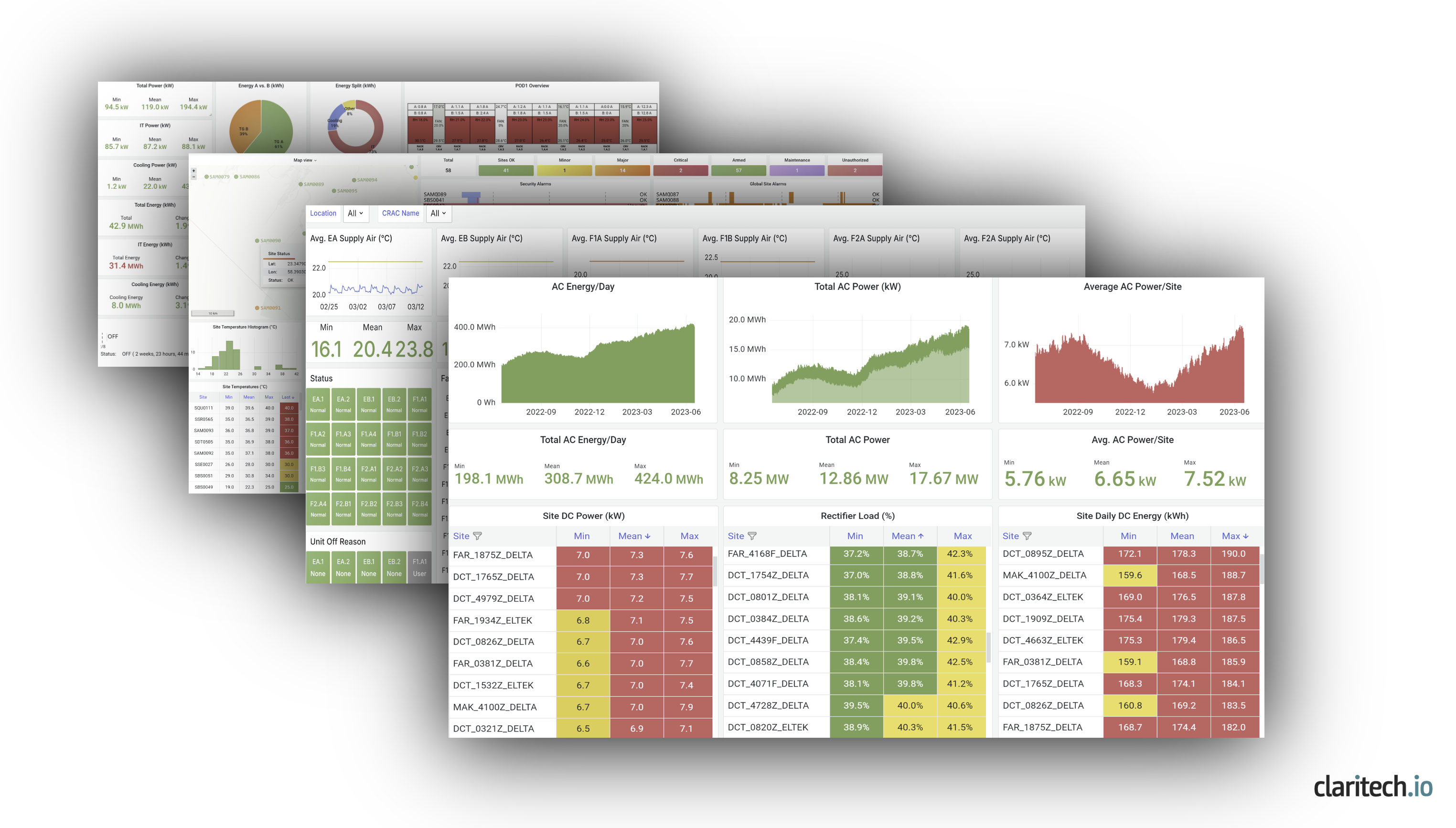
Introduction
ClaritechIO creates standardized power telemetry data from datacenters or telecom sites to make your network more energy efficient and reliable. This is a fundamental issue for network operators, with energy being one of the largest operational costs in any network.
The basis of what we do is standardize energy data from your existing network. Once this data is available, many benefits are possible just by analyzing the data itself.
Current Problem
The roadblock preventing network energy efficiency today is the inability to gather data about energy usage. Data is hard to come by due to:
- Different Site Types (From Small Edge Sites to Larger Datacenter Sites)
- Many different classes of site power equipment (DC plant, PDU's, batteries, generators, cooling, etc.)
- Many different manufacturers of site power equipment.
- Many ages and models of equipment.
- No standardization of how site equipment reports on itself.
- Many networks have additional legacy RTU/IoT/RMS solution data silos from previous attempts to manage small sites in the network, and BMS/DCIM or vendor-specific EMS software in larger datacenters.
Standardization of basic alarm data is sometimes done, but standardized energy telemetry data isn't.
Open Source is Better
Current proprietary hardware and software energy management tools create data silos that prevent network-wide energy efficiency measurements. New open-source tools for data streaming are better, less expensive, less risky, and constantly improving. These tools enable solutions based on open standardized data to support network energy efficiency without adding or replacing site hardware or existing software.
FOCUS DATA
FOCUS is the basis of all that we do. FOCUS uses open-source tools to gather, standardize, and deliver the data from your network - 25-100 standardized variables on several minute intervals from a typical cell site, or 30K+ variables per minute in a data center environment.
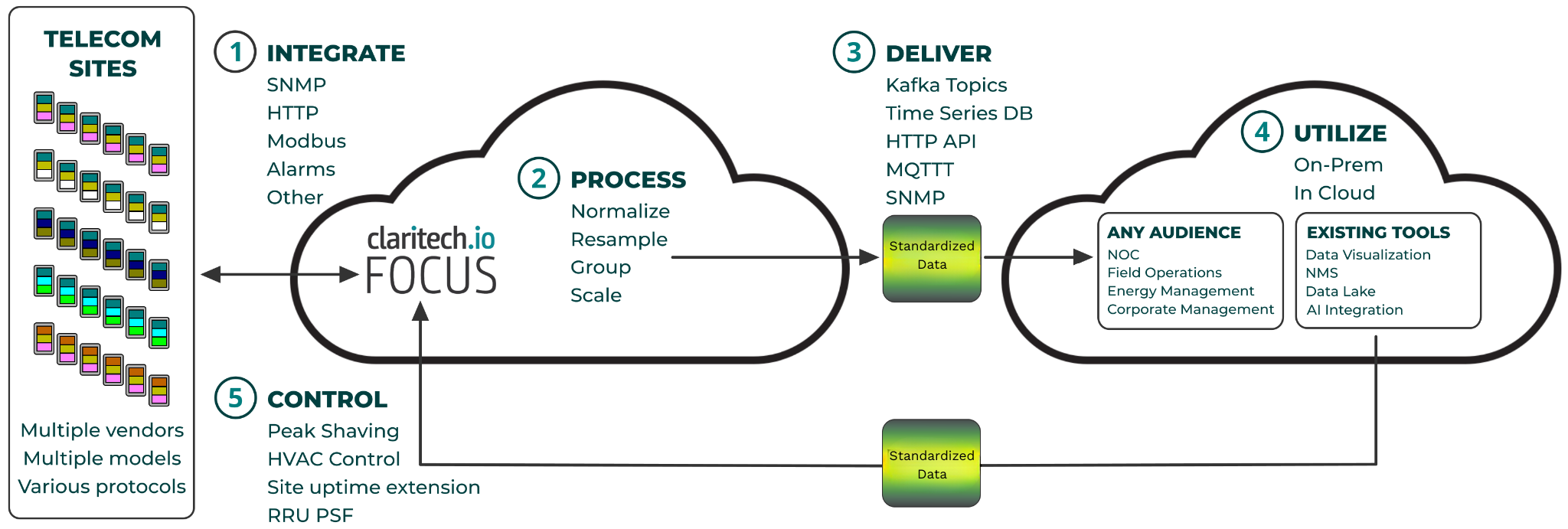
1.) Integrate - FOCUS interfaces to existing equipment manufacturer's equipment, gathering telemetry data from potentially thousands of sites.
2.) Process - FOCUS maps proprietary data from equipment to open standards created for each class of site equipment.
3.) Deliver - Standardized data is delivered to existing software or data pipelines in your network, and to new or existing data visualization tools.
4.) Utilize - Data is used for many different purposes by many different audiences. One usage that new standardized energy data is particularly useful for is being combined with billing data sources, an application that has enough depth to be described in its own section under "Solution".
5.) Control - Control is an advanced feature, where standardized data is sent back to the sites, creating a closed loop. You can send commands to start/stop a generator with the correct commands being sent to every site generator to perform the desired action.
The Result
In almost all cases we start projects by creating dashboards in excellent open-source data visualization tools such as Tableau or Grafana. This helps users understand what data is available and is the fastest and best way to measure all other energy efficiency efforts in your network.
Direct Energy Savings
We conservatively estimate that between .5-1% of energy costs can be saved, even in currently efficient networks, by simply using site data to make all sites in the network adhere as closely as possible to benchmarks. More savings are possible with more advanced control functions for:
- Peak Shaving/Site Life Extension - Alternating power sources to take advantage of power cost differences or in order to make a site last as long as possible by alternating grid power with batteries and generators.
- HVAC set point control - Continuous changes to HVAC set points to optimize cooling.
- RRU PSF - Remote Radio Unit Power Saving Features. FOCUS won't necessarily be involved in controlling the radios (though we could), but FOCUS is very well suited to measure the results of the use of radio vendor's power saving features in an unbiased manner across all the radio vendors in your network.
Individual Site Dashboards
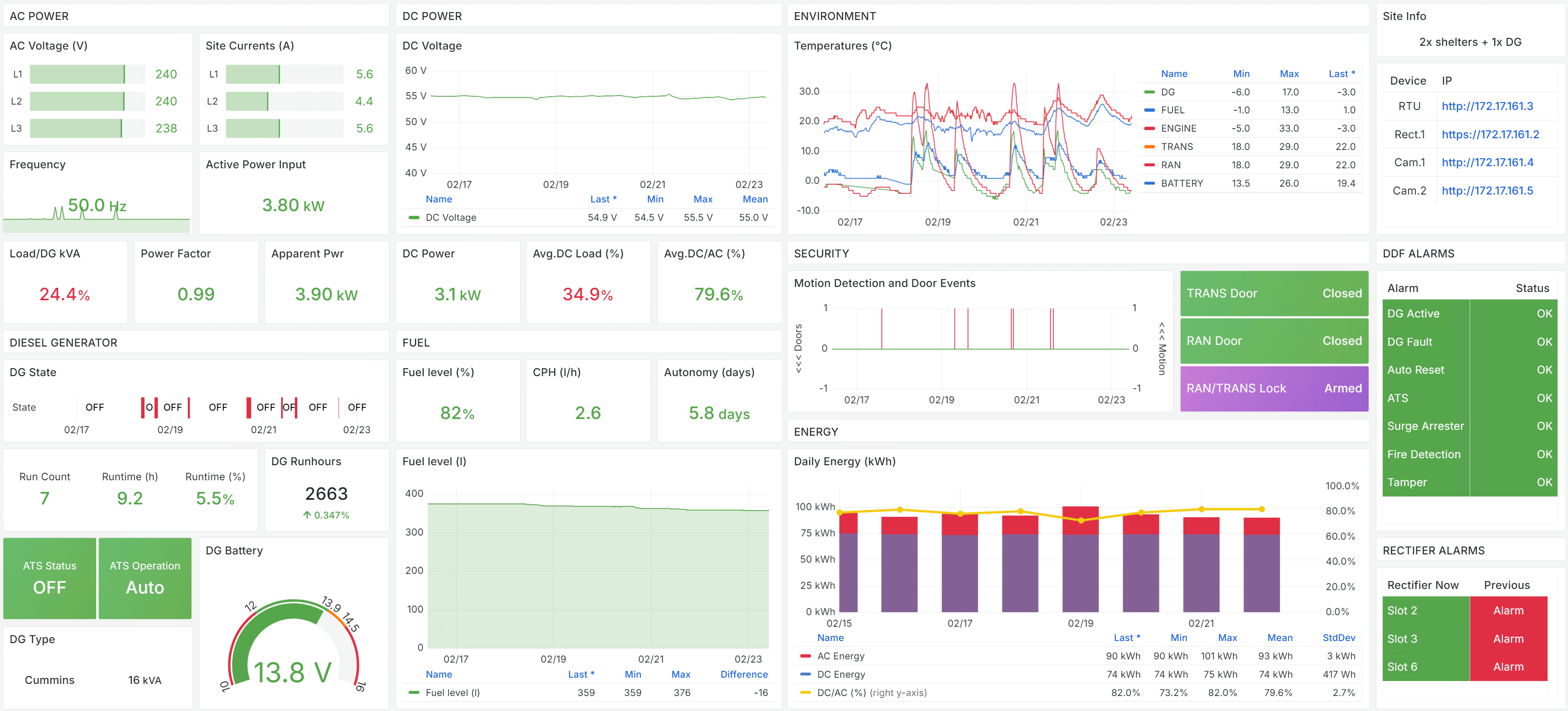
Every site will typically get an individual site dashboard to understand individual site conditions. If an aggregated network dashboard shows that a site is an outlier from standard and not functioning correctly, a first step will be to go to a site dashboard to diagnose what the problem is. In Image 1 below you can see AC and DC power, environmental, security, and diesel generator data for a single cell site, including new FOCUS generated metrics like "fuel autonomy" indicating how long a site can be expected to run on the level of diesel fuel in the site's storage tank.
Network Dashboards
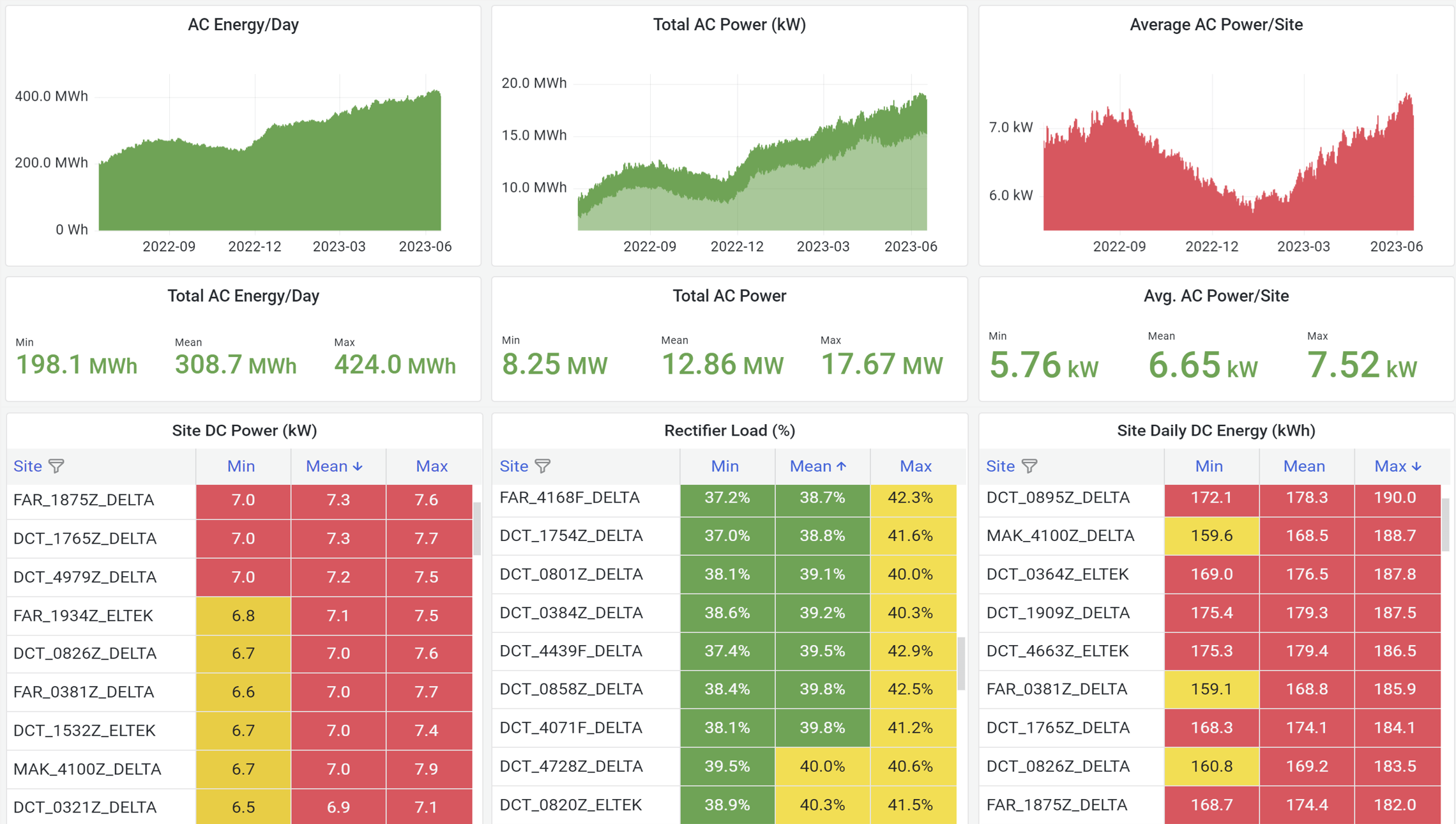
The real value of standardized energy telemetry data from 1000's of sites becomes apparent when you look at network dashboards. It is simple to rank worse performing sites by many different metrics, giving a clear roadmap to making individual sites adhere more closely to benchmarks and to creating more energy efficient networks. Image 2 below shows various energy metrics in stacked rankings and includes total network power histograms at the top which show seasonal variations and total network energy growth over time.
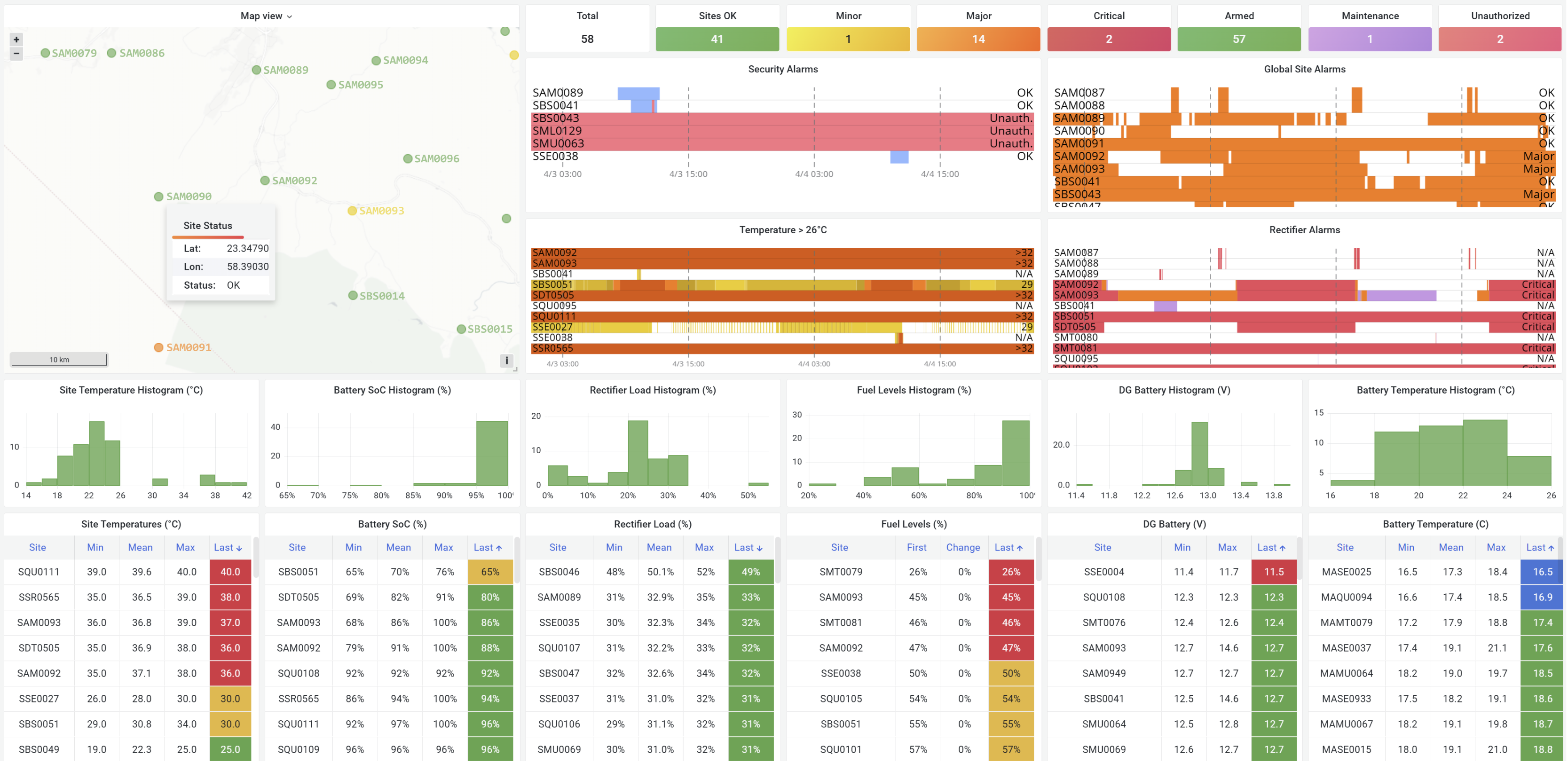
Different network views are common, based on how the data and dashboards are integrated into a telco customer's day-to-day operations and depending on the role of the audience. The same standardized telemetry data will serve many different purposes. Image 3 below includes a site map view and overall alarm tables, as well as site ranking data.
DataCenter Dashboards
Older, proprietary solutions, don't fit each of the sites in a telecom network. Often telecom operators are using multiple subpar methods to manage network energy, with larger datacenter sites being managed by building management software (BMS), element management software (EMS), or datacenter infrastructure management (DCIM) software, and smaller sites either unmanaged or managed with other remote monitoring system (RMS) tools. FOCUS has the advantage of working with any site size, from the smallest edge sites to the largest datacenters. Image 4 below is a small central office datacenter with a floor/rack map in upper right.

Datacenters have more data to be analyzed than smaller sites. Image 5 below is a rack level dashboard showing power and load of individual power distribution units (PDU) in a datacenter for capacity planning.

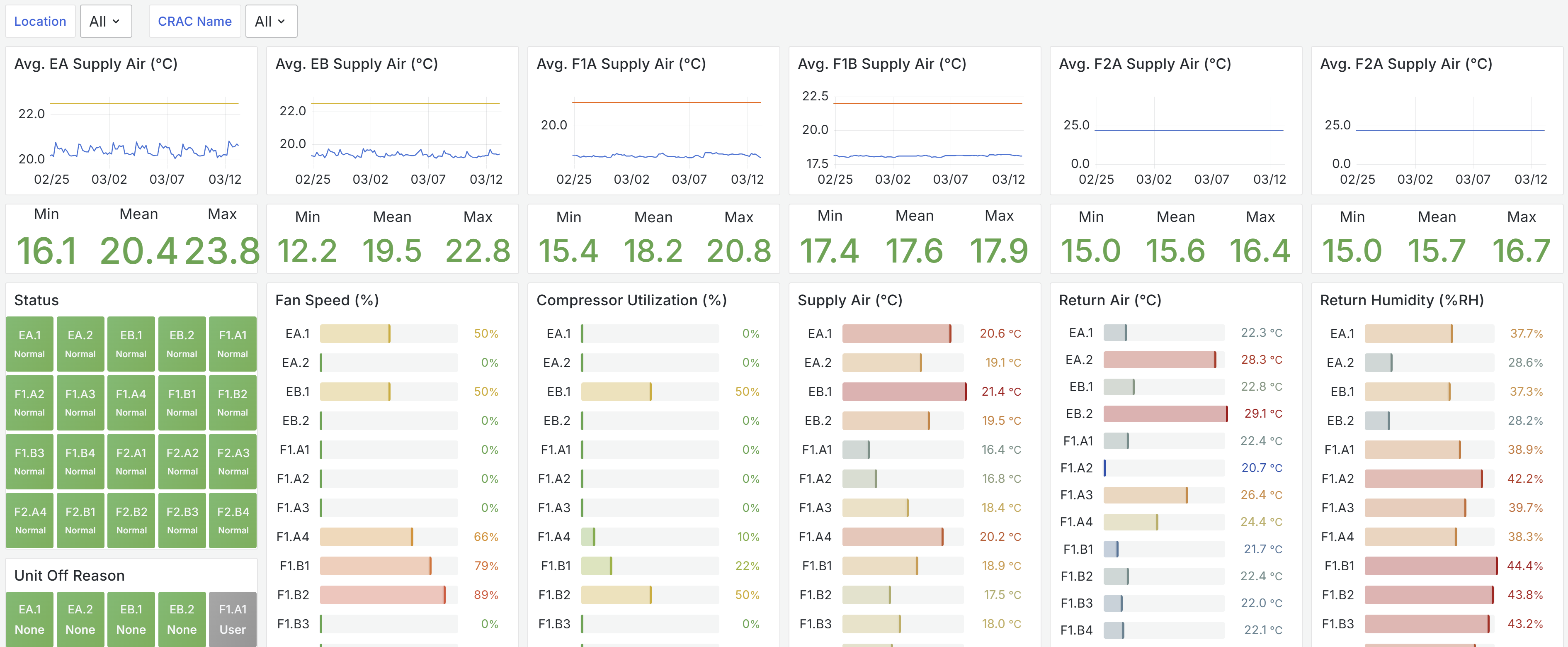
Image 6 below is a computer room air conditioning (CRAC) dashboard which can be used to spot improperly functioning cooling units and help plan cooling capacity.
Specialized Dashboards
As you learn to use the data, you will find the need for new dashboards to support specific initiatives or interests. Image 7 below is an example of a battery management dashboard across a network of cell sites. You can discover sites that are functioning improperly with high levels of discharge events or high battery temperatures, as well as see network-wide distributions in the histograms at the top.
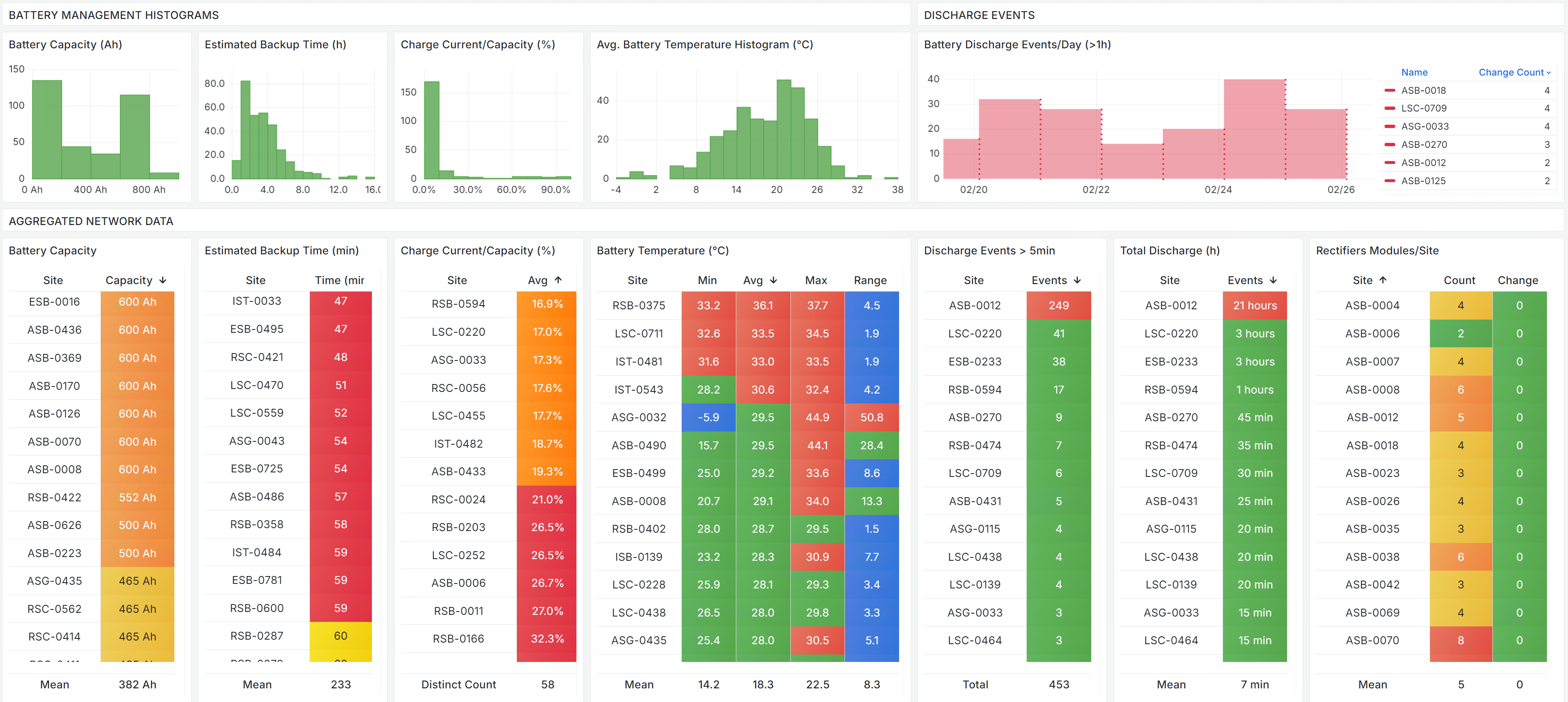
Image 8 below is a specialized dashboard that is based on new metrics created by FOCUS for the specialized purpose of tracking service level agreement (SLA) adherence for a towerco.

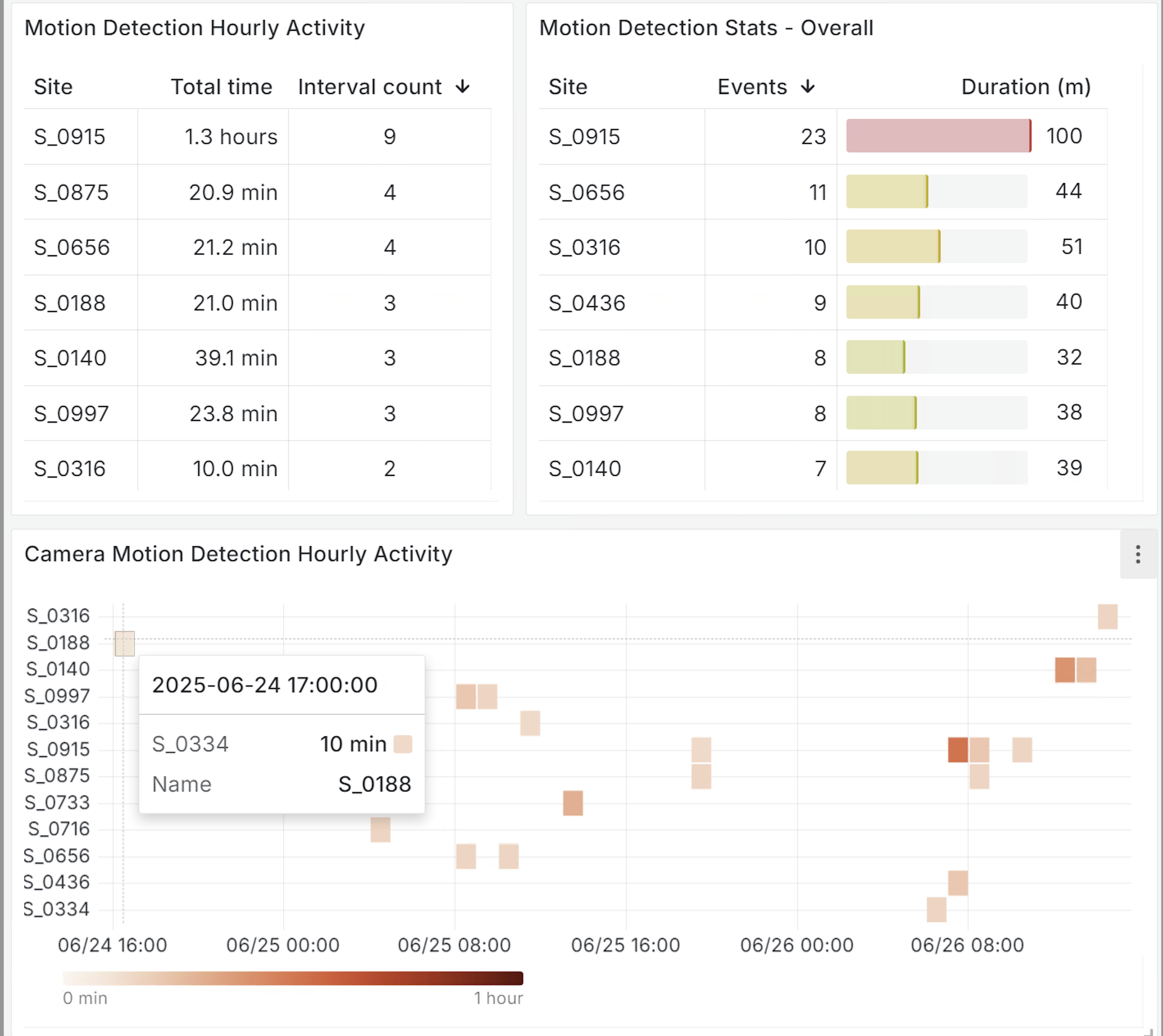
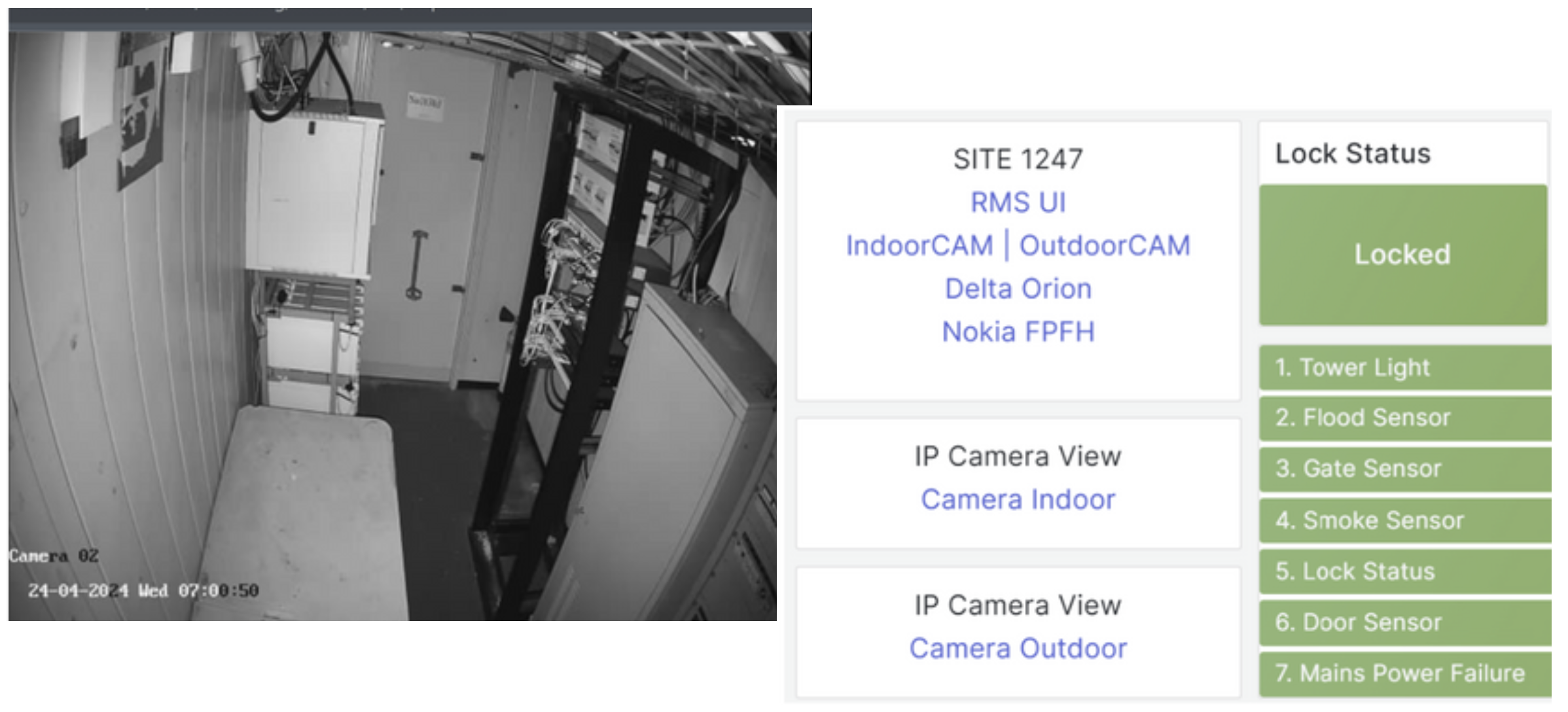
Image 9 and 10 below show a specialized function for camera applications. Cameras can be managed very similarly to any other equipment at a remote cell site. Though cameras are more of a security tool than a network efficiency tool, we often see correlations between site visits and sites losing adherence to network energy benchmarks.
Control Functions
It is important to note that the primary value that FOCUS brings is standardized data, both from telecom sites to the network's core but also control from the core to distributed telecom sites. The really exciting part of the control functions are in considering upcoming AI applications. Potential functions include HVAC set point control, back-up generator control, remote radio unit power saving features (RRU PSF), lithium-ion battery peak shaving, and site life extension via alternating back-up power sources and batteries.
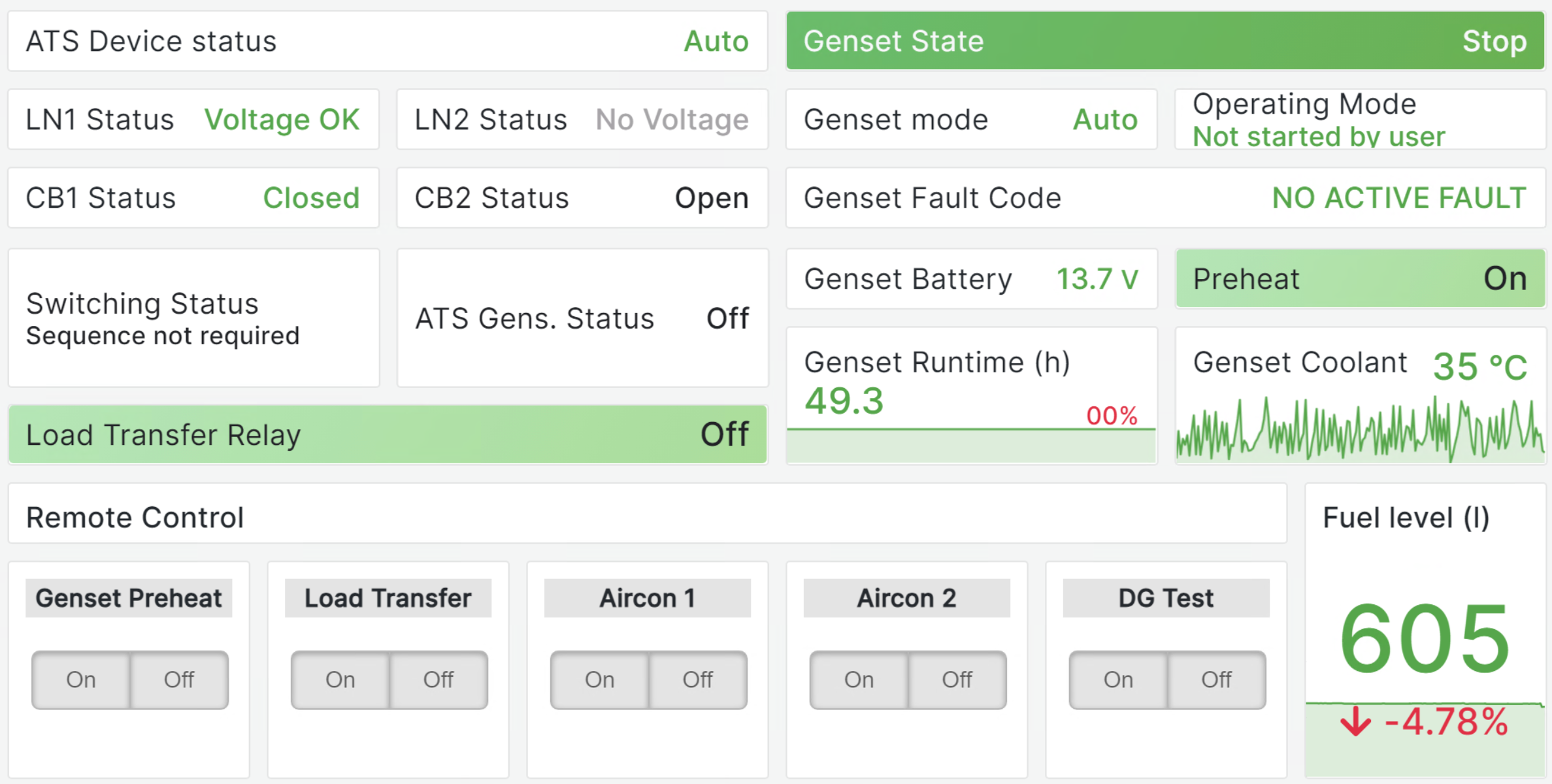
Image 11 below shows simple generator control functions embedded into a dashboard.
Conclusion
Many more dashboards are available and dashboards are just the start. Contact us for a more in-depth review of how FOCUS can be applied to your network!